
The Architecture Behind Your Application's Data
If your database is the house where your application's data lives, then the database schema is the architectural blueprint that defines how that house is built.
Every app you build handles data, whether it's user profiles, products, notifications, or logs. But you can't just dump this information into a database like a messy stack of loose papers and hope your backend knows what to do with it. Your application requires consistency. It needs to know exactly what format the data is in, where to find it, and how different pieces of data connect with each other.
The database schema is that formal, organized plan that ensures your data remains predictable, clean, and ready to scale.
In this article, we will break down exactly what a database schema is, how it works, what core components it contains, and why it matters more than most people think when starting a new project.
What is a Database Schema?
A database schema is the structural skeleton of your database. It defines how data is organized, stored, and accessed within a database—it handles the shape of the data, not the data itself.
To go back to our house analogy: an architectural blueprint does not tell you who lives inside a room or what color the curtains are. It tells you where the rooms are, how the rooms connect, and the physical limits of each space. A database schema does the exact same thing for your application.
In day-to-day software development, a schema formally declares:
- Tables: The distinct buckets where data lives (e.g.,
users,products,orders). - Columns: The specific data fields inside each table (e.g.,
email,created_at,status). - Data Types: The explicit type of data each column holds (e.g., String, Integer, Timestamp, Boolean).
- Constraints: The rules that prevent bad data from creeping in (e.g., marking a field as
NOT NULL, enforcingUNIQUEemails, or applyingDEFAULTvalues). - Relationships: How separate tables link together to create meaning (e.g., connecting a row in
ordersto a specific row inusersvia a Foreign Key). - Indexes: The lookup structures created to speed up data retrieval (e.g., indexing an
emailcolumn so user logins take milliseconds instead of scanning the whole table).
Key Components of a Database Schema
Understanding a database schema means understanding the fundamental objects that make up that structure. While schemas can contain many different object types, they all start with five core components: Tables, Columns, Relationships, Constraints, and Indexes.
Let's break them down, starting with the most important one.
-
1. Tables
The Table is the primary unit of storage in any relational database. It is the container that holds your actual data. In software design, each table represents a distinct entity your application needs to manage (e.g.,
Users,Products,Orders,Posts).A relational database table functions just like a spreadsheet table:
- Each Row contains a single, unique record (e.g., one specific product).
- Each Column is a specific field for that record (e.g.,
price).
For example, a physical Products table within your database might look like this:
id sku name description price is_active created_at 1 TS-BLUE-SM Vintage Blue T-Shirt Classic cotton tee (S) 24.99 TRUE 2024-03-15 08:30:00 2 KBF-001 Wireless Mechanical Keyboard RGB-backlit 75% layout 129.50 TRUE 2024-03-16 10:15:00 3 MUG-REDEEM Ceramic Coffee Mug Red matte finish, 12oz 15.00 FALSE 2024-03-17 14:00:00 Crucially, a record (or row) is the actual data within the table. The schema defines the structure of the table itself—it declares that the
Productstable must have anid, ansku, aprice, etc. -
2. Columns & Data Types
If a table is a container, Columns are the fields inside it. Every column must have a designated Data Type that tells the database engine exactly what kind of value it can hold.
Each database engine uses its own specific data types, but they all share a universal set of core types:
- INTEGER: Whole numbers (e.g.,
id,quantity). - VARCHAR / TEXT: Alpha-numeric strings (e.g.,
email,product_name). - BOOLEAN: True or false flags (e.g.,
is_active,is_verified). - TIMESTAMP / DATE: Calendar dates and times (e.g.,
created_at,login_time). - DECIMAL / FLOAT: Numbers with fractional parts (e.g.,
price,ratings). - JSON / JSONB: Structured JSON objects for semi-structured data.
- BINARY / BLOB: Raw binary files (e.g., images, encrypted data).
Some types accept extra parameters, like setting a character limit for
VARCHARor defining precision forDECIMAL. Choosing the right data type is crucial; a bad choice directly hits your storage, performance, and user experience.Why Bad Data Types Cost You: 3 Examples
- Performance Loss: Storing a product price as a
VARCHARforces the database engine to cast the text into a number every time it executes a mathematical formula or sorts by price. - Storage Waste: Defining a field that only needs 2 to 3 bytes (like a country code) as a fixed
CHAR(100)wastes valuable disk space and memory buffers across millions of rows. - Bad User Experience: Restricting a user profile bio or a blog post column to a strict
VARCHAR(100)means the app will error out or truncate the text the moment a user tries to write a complete sentence.
- INTEGER: Whole numbers (e.g.,
-
3. Constraints
At this point, we’ve planned out our house’s rooms (tables) and decided what belongs in each room (columns). But before we let data move in, we need a way to enforce the house rules.
That is where Constraints come in. They act as automated gatekeepers at the database level, ensuring that only data that follows your exact rules is allowed inside.
Without constraints, buggy application code could easily corrupt your database by passing empty values, duplicate records, or completely invalid inputs.
Here are the most common constraints used to keep data clean:
- PRIMARY KEY: The ultimate identifier. It uniquely identifies each row in a table and guarantees that no two records are identical; this is typically managed using an auto-incrementing
INTEGERor a universally unique string like aUUID(e.g.,id). - FOREIGN KEY: The connector. It links a column in one table to the primary key of another table, enforcing referential integrity so you don't end up with orphaned records (e.g., preventing a
postfrom belonging to auser_idthat doesn't exist). - NOT NULL: The mandatory check. It ensures that a column cannot be left empty or missing (e.g., every user must have an
email). - UNIQUE: The anti-duplicate rule. It ensures that all values in a column are entirely distinct across the whole table (e.g., no two users can register with the exact same
username). - DEFAULT: The safety net. It automatically injects a fallback value if the application doesn't provide one during a write operation (e.g., setting
statusto'pending'orcreated_atto the current timestamp). - CHECK: The boundary wall. It validates that the values in a column meet a specific logical condition before saving (e.g., ensuring
age >= 18orprice > 0).
- PRIMARY KEY: The ultimate identifier. It uniquely identifies each row in a table and guarantees that no two records are identical; this is typically managed using an auto-incrementing
-
4. Relationships
Tables in a database are rarely isolated islands; they are built to connect. A relationship links different tables together so that your data can work as a unified system.
Consider your day-to-day social media usage. When you visit a friend’s profile, the app instantly pulls up all the posts they have ever written. That is a database relationship in action. Behind the scenes, the app has a
profilestable and apoststable. Inside thepoststable, there is a Foreign Key column calledprofile_idthat references back to theprofilestable. When your friend creates a post, the primary key of their profile record is stored inside theprofile_idcolumn of that new post.In relational databases, these connections fall into three distinct patterns:
-
One-to-Many (1:M)
The most common relationship type. A single record in Table A can connect to multiple records in Table B, but a record in Table B belongs to only one record in Table A.
- Example: One user can write many blog posts, but each blog post belongs to only one author.
- Where the Foreign Key goes: The Foreign Key always goes on the "Many" side (e.g., placing
user_idinside thepoststable).
-
One-to-One (1:1)
A strict pairing. A single record in Table A can connect to exactly one record in Table B, and vice versa. This is usually used to split up massive tables or isolate sensitive data.
- Example: A user has exactly one private user settings profile, and that settings profile belongs to only that specific user.
- Where the Foreign Key goes: The Foreign Key can go in either table, but it must be paired with a
UNIQUEconstraint to ensure a second record can never link to the same parent.
-
Many-to-Many (M:N)
A complex matrix. Multiple records in Table A can relate to multiple records in Table B.
- Example: A blog post can have many tags (like
#SEO,#Database), and a single tag can be attached to many different blog posts. - Where the Foreign Key goes: You cannot put a foreign key directly into either table. Instead, you must create a third table called a Junction Table (or Pivot Table). This table sits in the middle and holds two separate Foreign Keys (e.g., a
post_tagstable containingpost_idandtag_id).
- Example: A blog post can have many tags (like
-
-
5. Indexes
If you want to find a specific phrase in a 500-page book, you have two choices: flip through every single page from front to back, or flip to the index at the back, find the keyword, and jump straight to the exact page number.
A database index functions exactly like that book index.
By default, if you query a table for a specific record (like looking up a user by their email), the database engine has to perform a Table Scan—meaning it reads through every single row one by one until it finds a match. If your table has millions of rows, this tanks your application's performance.
When you add an index to a column:
- The database creates a separate, highly optimized lookup pointer system (typically using a structure called a B-Tree).
- Instead of scanning millions of rows, the database quickly traverses this pointer structure to locate and pull the exact data you requested in milliseconds.
The Trade-Off: While indexes make reading data incredibly fast, they come with a cost. Every time you write, update, or delete data, the database has to update the index as well. Over-indexing your schema will slow down your write operations and eat up extra disk space.
Database Schema vs. Database Table: What’s the Difference?
Because the terms are often used interchangeably in casual developer conversations, it’s easy to confuse a database table with a database schema. However, they operate at completely different levels of abstraction.
The easiest way to separate them is by looking at their scope:
- A Database Table is a single storage unit. It is a concrete collection of rows and columns that represents one specific real-world entity in your application—such as
customers,products, orposts. The table is where your actual data physically sits. - A Database Schema is the entire ecosystem. It is the overarching structure that encompasses all of your tables. The schema defines what those tables are named, the explicit data types each column can hold, how those tables relate to one another, and the rules governing how data is accessed and secured.
The Quick Takeaway: A table is a single container holding a specific type of item; the schema is the entire warehouse layout planning where every single container goes.
Types of Database Schemas
The word "schema" gets thrown around a lot in software engineering, and its exact meaning can change depending on who you are talking to and at what stage of the project you are in.
When designing software, database architectures typically evolve through three distinct phases: Conceptual, Logical, and Physical.
To master this process step-by-step, you can check out our full guide to learn database schema design.
-
1. Conceptual Schema (The Big Picture)
This is the high-level, bird’s-eye view of your data architecture. It focuses entirely on the business logic—identifying the core entities that exist in your system and how they connect—without worrying about technical limitations, syntax, or data types.
- When it happens: This is what you sketch on a whiteboard or a Miro board during the initial brainstorming phase of an app.
- Example: A simple flow chart showing that a
Customerplaces anOrder, and anOrdercontainsItems.
-
2. Logical Schema (The Technical Blueprint)
This is a much more precise version of your conceptual model. Here, you start mapping out the explicit structure by defining specific tables, columns, relationships, data types, and constraints. It is still technology-agnostic (meaning you haven't picked a specific database provider yet), but it is structured enough that any engineer can look at it and understand exactly how the system works.
- When it happens: When creating Entity-Relationship Diagrams (ERDs) before writing any actual code.
- Example: Declaring that the
customerstable has anemailcolumn typed as a string, which must beUNIQUE.
-
3. Physical Schema (The Code Implementation)
This is the actual code implementation tailored to a specific database management system (like PostgreSQL, MySQL, or SQLite). It translates your logical layout into the exact database-specific syntax required to build the structure. It handles the lowest level of detail, including physical storage configurations, partition strategies, and indexes.
- When it happens: When you write raw DDL (Data Definition Language) SQL scripts or define tables inside your framework's ORM (Object-Relational Mapper) migrations.
- Example: Running a
CREATE TABLEscript in PostgreSQL that explicitly provisions aB-Treeindex on aUUIDprimary key.
What developers actually mean: In day-to-day coding, when an engineer asks to "see the schema," they are usually talking about something right between the logical and physical level—the working code file (like a
schema.rbin Rails or a Prisma schema file) that dictates the current layout of the production database.
Real-World Example: An E-Commerce Database Schema
Theory is great, but the best way to understand schema design is to look at how a production system actually organizes its data. Let’s look at a transactional Online Transaction Processing (OLTP) schema for a scalable e-commerce application.
Instead of just keeping it to basic orders, a real application requires a highly relational ecosystem to manage users, stock, shopping baskets, and incoming payments without duplicating data.
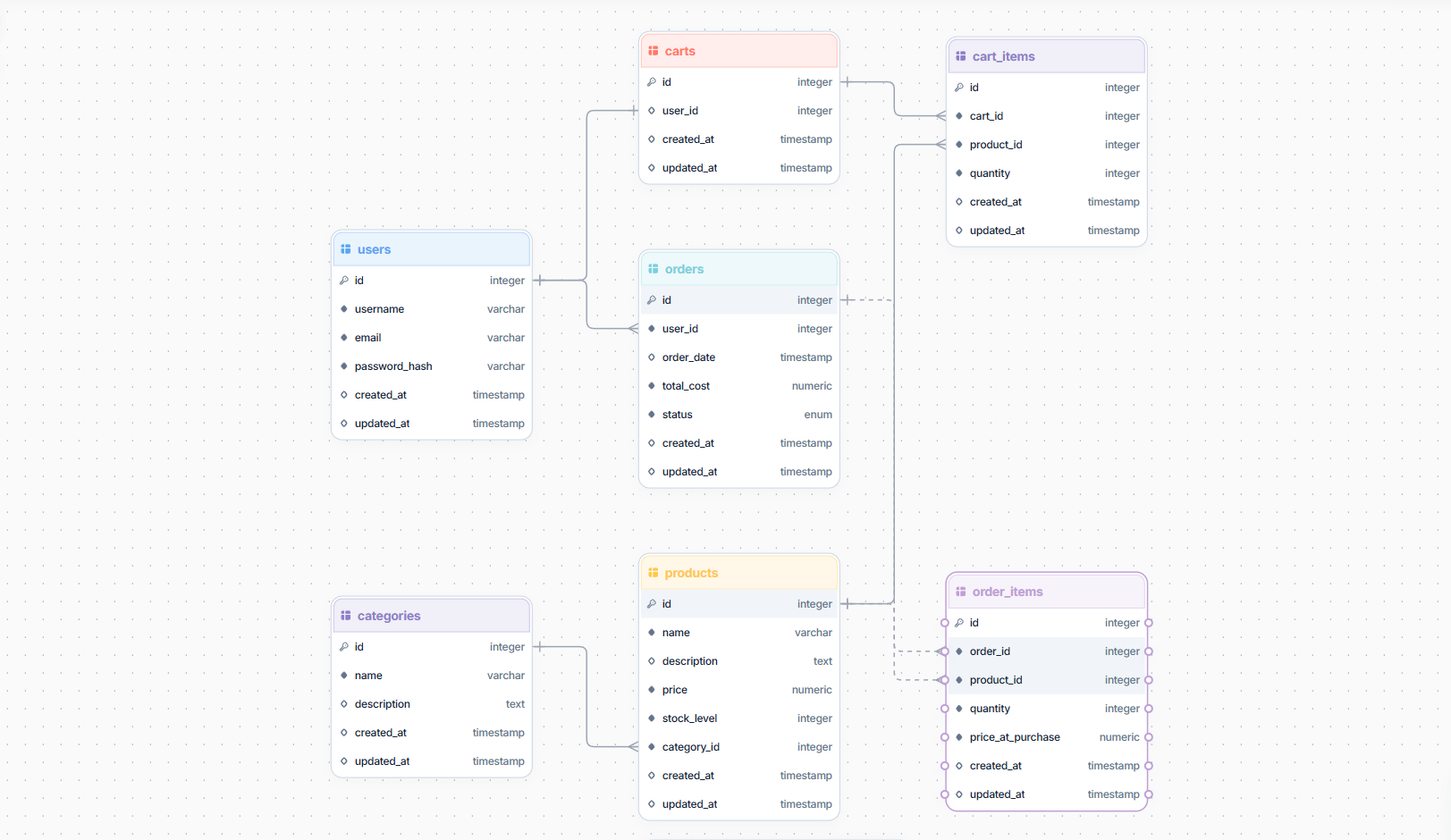
Our system is built around 7 core tables:
users: Stores client profiles and authentication states.categories: Manages product groups (e.g., "Electronics", "Apparel") to keep catalogs organized.products: Contains product listings, stock levels, prices, and references their parent category.carts: Tracks active shopping sessions before a customer checks out.cart_items: A junction table linking products to active carts, capturing quantities.orders: Records finalized purchases, total costs, order statuses, and ties back to the customer.order_items: A historical junction table that maps products to finalized orders, capturing historical prices at the exact moment of purchase.
-
The Entity-Relationship Diagram (ERD)
An ERD provides a visual roadmap of how these 7 tables connect through Primary and Foreign Keys:
-
The Data Definition Language (DDL) Code
To turn this logical map into a physical database, we use DDL SQL code. Here is the exact script written for PostgreSQL to build our structure, featuring data types, indexes, and referential constraints:
BEGIN;

CREATE TABLE "order_items" (
id SERIAL NOT NULL PRIMARY KEY,
order_id INTEGER NOT NULL,
product_id INTEGER NOT NULL,
quantity INTEGER NOT NULL,
price_at_purchase NUMERIC(10, 2) NOT NULL,
created_at TIMESTAMP NULL DEFAULT CURRENT_TIMESTAMP,
updated_at TIMESTAMP NULL DEFAULT CURRENT_TIMESTAMP
);

CREATE TYPE "orders_status_enum" AS ENUM(
'pending',
'processing',
'shipped',
'delivered',
'cancelled'
);

CREATE TABLE "orders" (
id SERIAL NOT NULL PRIMARY KEY,
user_id INTEGER NOT NULL,
order_date TIMESTAMP NULL DEFAULT CURRENT_TIMESTAMP,
total_cost NUMERIC(10, 2) NOT NULL,
status orders_status_enum NOT NULL DEFAULT 'pending',
created_at TIMESTAMP NULL DEFAULT CURRENT_TIMESTAMP,
updated_at TIMESTAMP NULL DEFAULT CURRENT_TIMESTAMP
);

CREATE TABLE "cart_items" (
id SERIAL NOT NULL PRIMARY KEY,
cart_id INTEGER NOT NULL,
product_id INTEGER NOT NULL,
quantity INTEGER NOT NULL DEFAULT 1,
created_at TIMESTAMP NULL DEFAULT CURRENT_TIMESTAMP,
updated_at TIMESTAMP NULL DEFAULT CURRENT_TIMESTAMP
);

CREATE TABLE "carts" (
id SERIAL NOT NULL PRIMARY KEY,
user_id INTEGER NULL UNIQUE,
created_at TIMESTAMP NULL DEFAULT CURRENT_TIMESTAMP,
updated_at TIMESTAMP NULL DEFAULT CURRENT_TIMESTAMP
);

CREATE TABLE "products" (
id SERIAL NOT NULL PRIMARY KEY,
name VARCHAR(255) NOT NULL,
description TEXT NULL,
price NUMERIC(10, 2) NOT NULL,
stock_level INTEGER NOT NULL DEFAULT 0,
category_id INTEGER NOT NULL,
created_at TIMESTAMP NULL DEFAULT CURRENT_TIMESTAMP,
updated_at TIMESTAMP NULL DEFAULT CURRENT_TIMESTAMP
);

CREATE TABLE "categories" (
id SERIAL NOT NULL PRIMARY KEY,
name VARCHAR(255) NOT NULL UNIQUE,
description TEXT NULL,
created_at TIMESTAMP NULL DEFAULT CURRENT_TIMESTAMP,
updated_at TIMESTAMP NULL DEFAULT CURRENT_TIMESTAMP
);

CREATE TABLE "users" (
id SERIAL NOT NULL PRIMARY KEY,
username VARCHAR(255) NOT NULL,
email VARCHAR(255) NOT NULL UNIQUE,
password_hash VARCHAR(255) NOT NULL,
created_at TIMESTAMP NULL DEFAULT CURRENT_TIMESTAMP,
updated_at TIMESTAMP NULL DEFAULT CURRENT_TIMESTAMP
);

ALTER TABLE "cart_items"
ADD CONSTRAINT "fk_carts_cart_items" FOREIGN KEY (cart_id) REFERENCES "carts" (id);

ALTER TABLE "products"
ADD CONSTRAINT "fk_categories_products" FOREIGN KEY (category_id) REFERENCES "categories" (id);

ALTER TABLE "carts"
ADD CONSTRAINT "fk_users_carts" FOREIGN KEY (user_id) REFERENCES "users" (id);

ALTER TABLE "order_items"
ADD CONSTRAINT "fk_orders_order_items" FOREIGN KEY (order_id) REFERENCES "orders" (id);

ALTER TABLE "orders"
ADD CONSTRAINT "fk_users_orders" FOREIGN KEY (user_id) REFERENCES "users" (id);

ALTER TABLE "order_items"
ADD CONSTRAINT "fk_products_order_items" FOREIGN KEY (product_id) REFERENCES "products" (id);

ALTER TABLE "cart_items"
ADD CONSTRAINT "fk_products_cart_items" FOREIGN KEY (product_id) REFERENCES "products" (id);

COMMIT;
Conclusion: The Developer Mindset
Building a great database schema isn't about achieving absolute perfection on your very first try. Instead, the developers who build the most resilient applications adopt an evolutionary mindset. They accept that as business requirements shift and applications scale, schemas must inevitably grow and change alongside them.
The secret to mastering data architecture isn’t just memorizing definitions—it is all about consistent learning and active practice. Every time you sketch an Entity-Relationship Diagram (ERD), run an ORM migration, or debug a slow query, your architectural instincts sharpen. Don't be afraid to spin up a local database instance, input dummy data, and intentionally test the limits of your constraints and relationships.
If you are ready to put this mindset into action and build optimized, production-ready backend systems, you can check out our practical blueprint to learn database schema design.